
A website needs external links from third-party resources. According to Google Help , these can partially influence your website’s ranking: “Link-based analysis can help you accurately determine whether a website is truly useful and interesting to users.” There are various ways to get backlinks. I’d like to discuss the outreach method.
But first, a few words about the method itself.
- Specifics of outreach promotion
- Collecting keywords to find sites in search engine results
- Search for promising sites
- Relevance and quality of donor sites. Key criteria
- Search for contacts
- Forming a letter to the webmaster
- Selecting relevant sites based on price and metrics
- Writing an article taking into account the requirements of the sites
- Posting an article on a donor site
- Analysis of link placement results
- Remember
Specifics of outreach promotion
Outreach links are external links on a donor website. To obtain them, you need to establish contacts and negotiate with the administrators or owners of resources you deem suitable.
This method is considered relatively safe. It allows you to select high-quality, unspammed sites and control the entire process. Although Google frowns on link exchange schemes , outreach links look natural, even though they are often purchased.
This “naturalness” is due to certain features of outreach promotion:
- links are placed on thematic resources in unique thematic publications that may be useful to visitors of the donor site;
- You can not only improve the ranking of your website pages, but also get additional traffic to them through clicks on links from donor sites, as well as a PR effect;
- There’s a high probability that the sites identified aren’t systematically selling links, but are placing them selectively and only high-quality ones. This can be determined by the outgoing link profile and the ratio of outgoing to incoming links (more on that later). This means the value of the placement increases, while the risk of being penalized for links on such sites is lower.
- There is a greater chance of making changes to the posted materials or links in them if necessary, since there is direct contact with the administrator or owner of the site;
- There may be many donor sites that meet your criteria, but not every site will agree to place a link under the best terms for you. Therefore, obtaining outreach links requires more work and time;
- placement prices are higher compared to, for example, exchange platforms.
Stages of outreach promotion
- Collecting keywords to search for sites in search engine results.
- Collecting websites from search results for collected queries and/or searching for sites through analysis of competitors’ link profiles—where they place their links.
- Determining the relevance and quality of the collected resources.
- Collecting email addresses of website representatives.
- Letter requesting cost and conditions for link placement.
- Selection of relevant sites based on price and metrics.
- Preparing content according to platform requirements.
- Posting and checking materials and links.
- Analysis of link placement results.
I propose to consider this entire process using the example of a website for an investment company in the Kazakhstan region.
This topic pertains to YMYL (Your Money or Your Life) sites, which can potentially impact a user’s well-being, health, financial stability, or safety. Google has strict requirements for these sites, so special attention should be paid to optimization in general and to link building in particular: it’s important to select only high-quality and reputable sites.
Another challenge was that some resources might refuse to host financial content or charge several times higher prices. Furthermore, there aren’t many relevant platforms in the Kazakhstan region.
Collecting keywords to find sites in search engine results
First, I compiled a list of keywords for searching for platforms. I ignored commercial queries, as they tend to show competitors’ websites, not sites with informational articles, media outlets, or specialized news portals.
First, you need to select keywords that best describe your website. Then, generate other keywords based on those keywords. For this, you can use Google Keyword Planner (if you have a paid Google Ads account) or Serpstat.
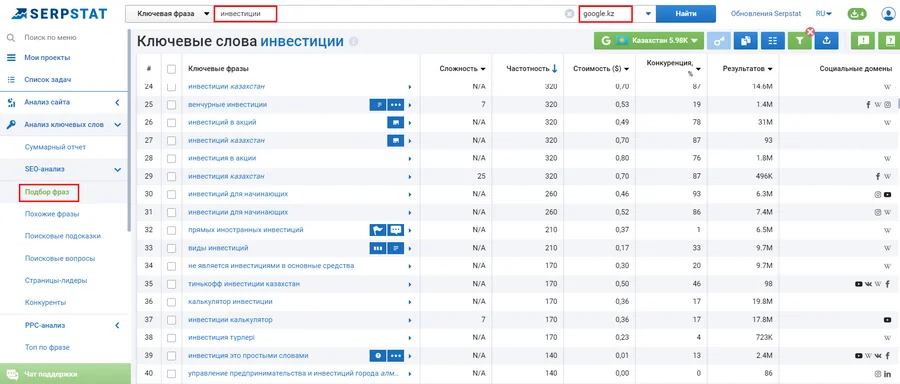
The collected queries must be cleared of irrelevant and low-frequency queries.
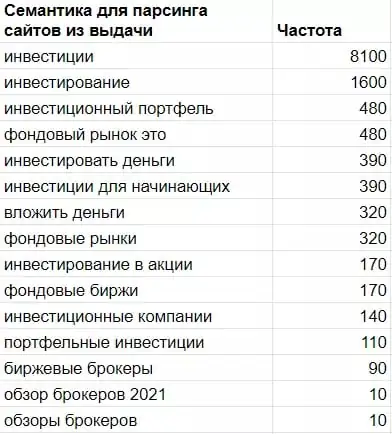
The frequency is specified only to determine the importance of the request; we will not need it for parsing.
Here is a list of queries that were worth collecting sites for.
Search for promising sites
Collecting websites from search results for collected queries
To find sites based on collected queries, you can use the “Search Engine Parser” tool in Netpeak Checker.
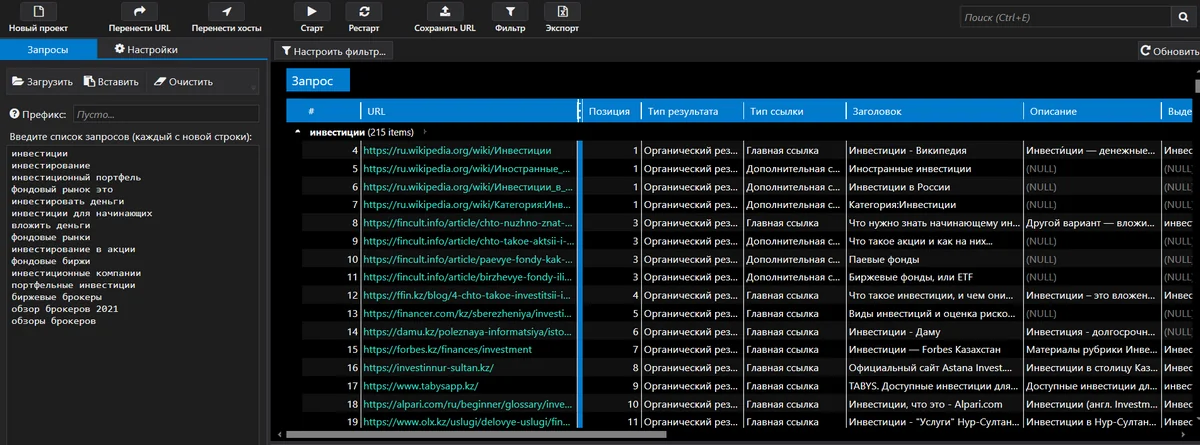
1. Enter the collected semantics in the “Queries” field. You can also use search operators and apply the same operator to each query using the “Prefix” field.
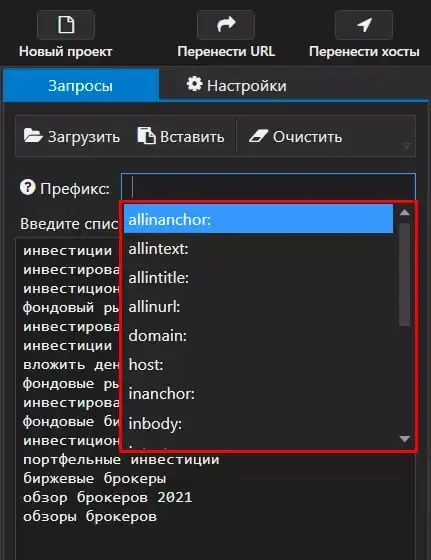
The following search operators are suitable for selecting sites:
- allinanchor – finds pages that contain all specified keywords in the anchor of their links;
- allintitle – finds pages that contain all specified keywords in the title;
- allintext – finds pages that contain all specified keywords in the text;
- inurl — will find pages that contain the specified keyword in the URL, but Cyrillic phrases must be transliterated for this to work. For searching across CIS regions, this operator can easily be replaced with the allintitle operator.
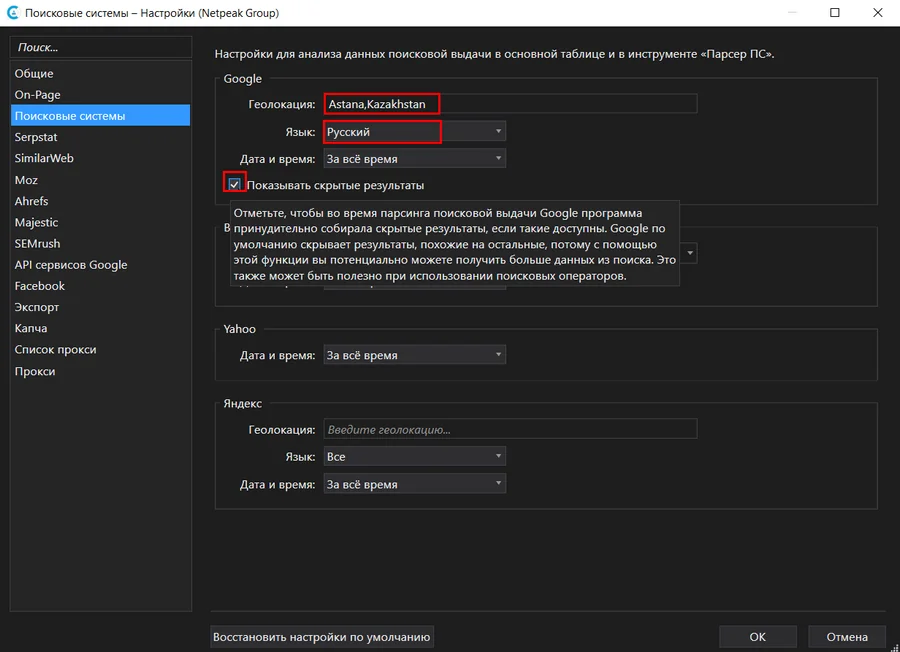
2. In the settings, I selected the Google search engine, the maximum possible number of results, and all available result types (special search elements, expanded and paid results), as I assumed there might be few relevant sites for the Kazakhstan region.
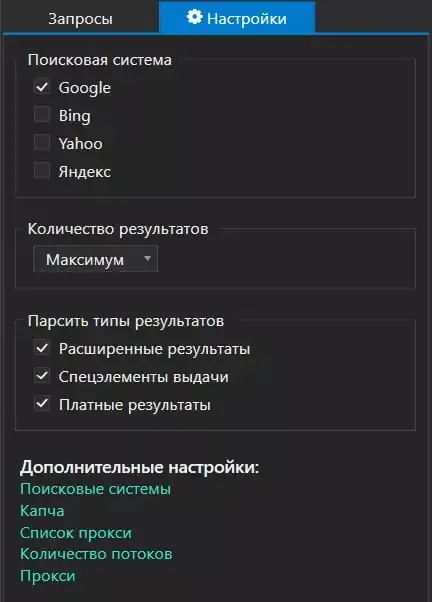
In the advanced settings, I selected Kazakhstan as the Google search location, the Russian language, and checked the option to collect hidden results to get more data from the search if it’s available.
3. After collecting the data, I received a list of pages from Google search results, grouped by queries.
4. Next, click the “Transfer Hosts” button to get a list of unique domains in the tool’s main table. Their relevance and quality are then determined based on a number of metrics.
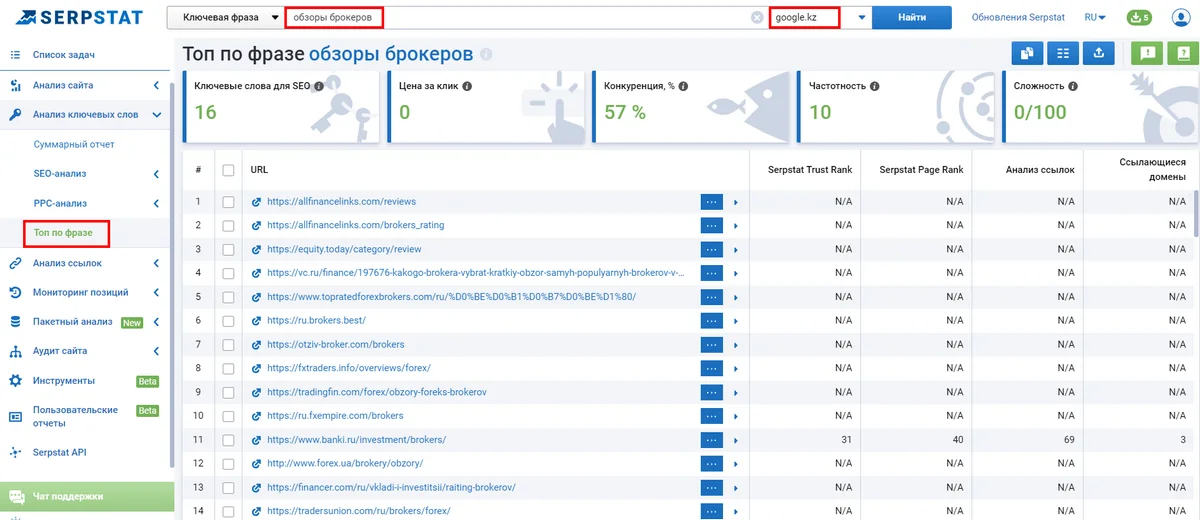
You can also collect search engine results for queries using Serpstat. The “Top Phrase” report shows the top 100 Google search and ad results for the searched keyword.
Searching for sites through analysis of competitors’ link profiles
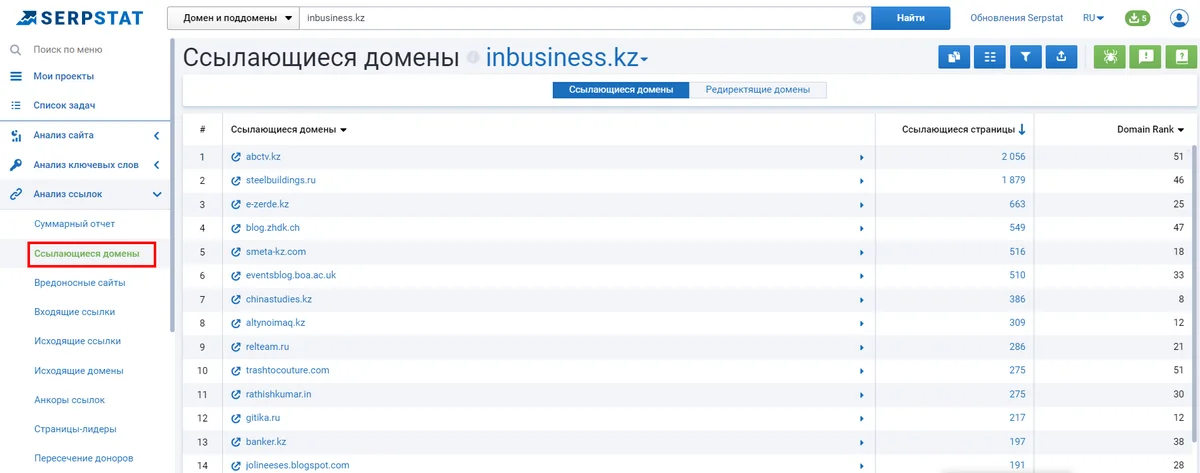
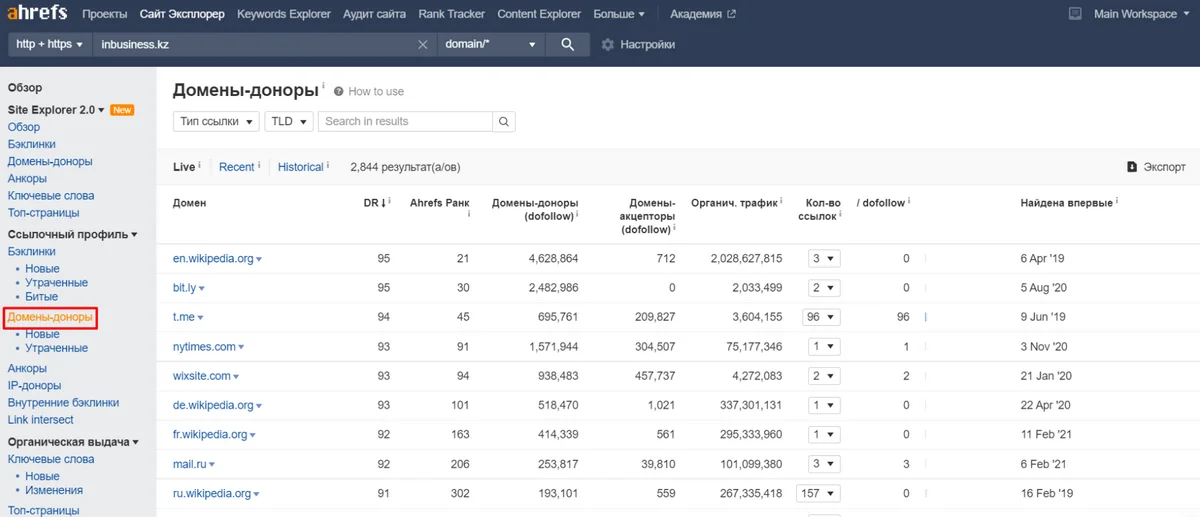
Another option for finding a donor site is to analyze the referring domains of competitors.
In Serpstat, you can do this using the “Referring Domains” report.
And Ahrefs – in the “Donor Domains” report
Relevance and quality of donor sites. Key criteria
Google states that “link quality has a greater impact on rankings than quantity.” The difficulty is that there’s no single criterion for determining a website’s quality. These metrics need to be assessed holistically. Higher metrics are, of course, better, but the price will likely be high as well. A single, ideal platform for a given budget is unlikely to have any impact. The challenge is finding donor sites that offer the best value for money.
The criteria below are listed not in order of importance, but rather based on the convenience of checking them in the right order. For example, it would be more efficient to manually check the topic and content of potential donors, after first removing sites with low scores collected automatically.
When analyzing numerical data, its absolute accuracy is unimportant. The key is to use data on a single criterion from a single source for all sites, ensuring that the margin of error is consistent and doesn’t affect the results.
The main tools for bulk metrics collection are Netpeak Checker and Serpstat.
Region
When selecting donor sites, it’s best to focus on sites in the same region as your target audience:
- with the corresponding national top-level domain(s);
- with top-level domains (.com, .net) that receive the majority of their traffic from the same country(ies) as the site for which donors are being selected.
In the case of donors for an investment company in Kazakhstan, I retained sites with the .kz domain and top-level domains, the main traffic to which comes from Kazakhstan.
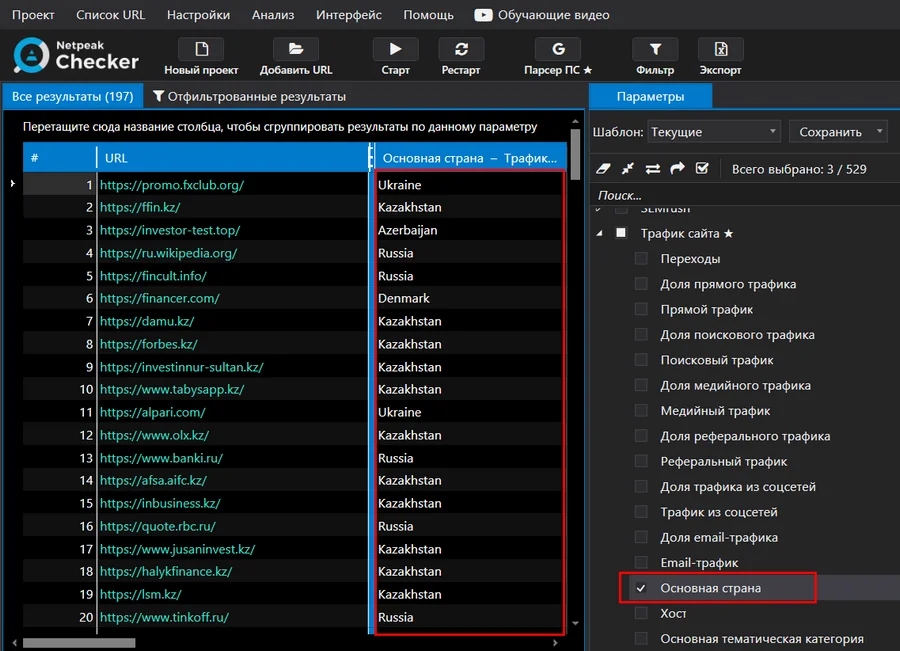
For a list of URLs, the region can be checked in Netpeak Checker by selecting the “Primary Country” option in the “Site Traffic” section.
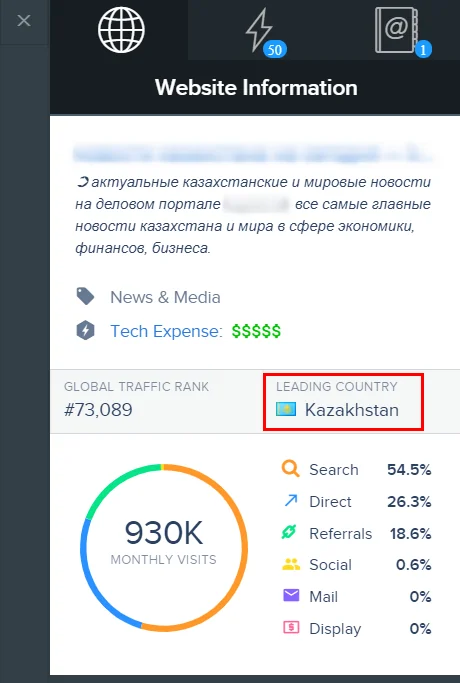
You can manually check the main region, for example, using the SimilarWeb extension.
And if it does not provide data, then through the SimilarTech Prospecting extension, the data source of which is SimilarWeb.
The next step is to remove domains with inappropriate regions from the list and check other metrics.
Website traffic
The overall traffic to a website gives an indication of its popularity. Furthermore, if traffic is low, the likelihood of a click on our link decreases, as does the opportunity to gain additional traffic.
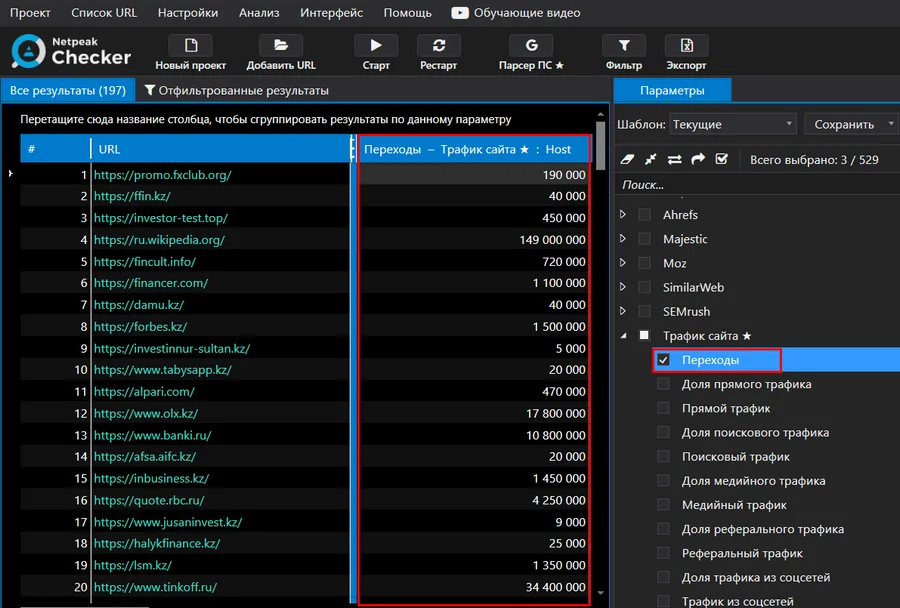
You can get monthly traffic data for a list of websites using Netpeak Checker. Select “Transitions” in the settings and start collecting data. The results will look like this.
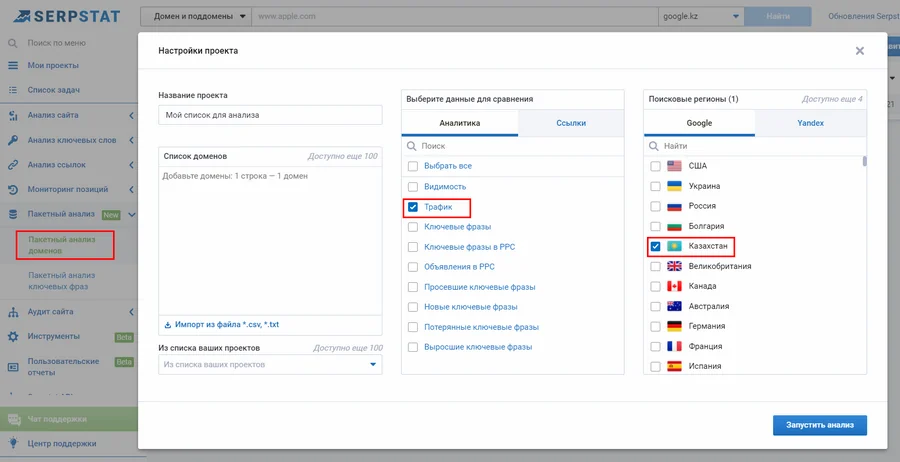
Another way to check the overall traffic for a list of websites is with the “Batch Domain Analysis” report in Serpstat. Add a list of domains, select “Traffic,” and then select the desired region (Kazakhstan).
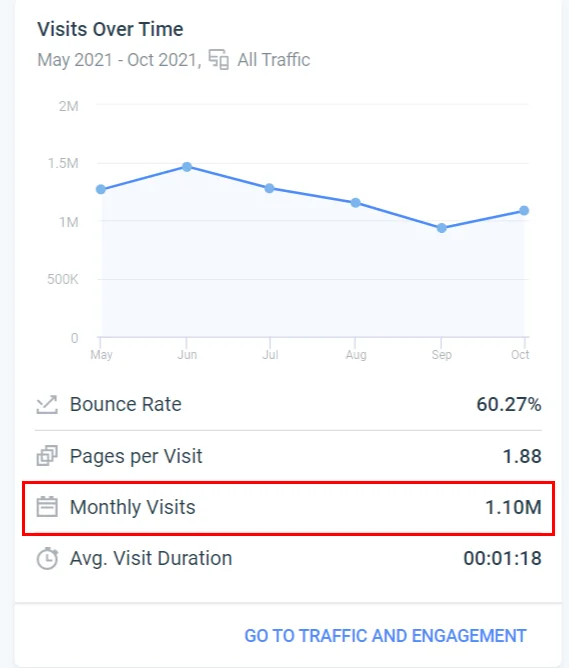
You can manually check your site’s total monthly traffic using the SimilarWeb extension.
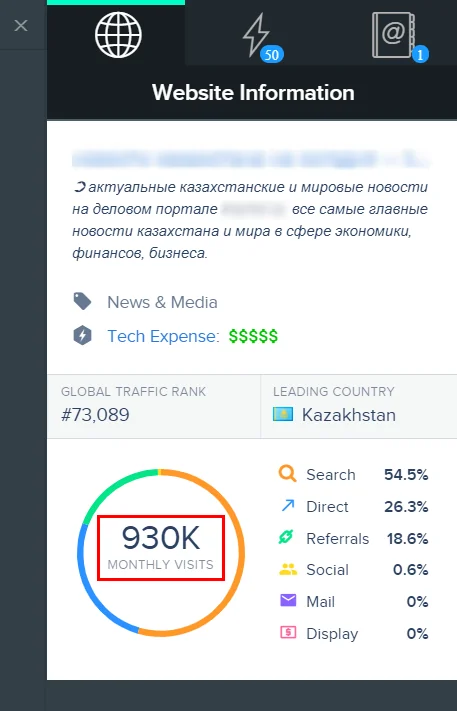
SimilarWeb may not provide data for sites with low traffic. In this case, the SimilarTech Prospecting extension, which uses SimilarWeb as its data source, can help.
It’s important to remove low-traffic sites from the list. This depends on the topic and region being promoted. Based on the results (the lowest figure is 500 visits per month), I left sites with a total traffic of at least 5,000.
Traffic source ratio
It’s also worth paying attention to traffic sources, specifically the share of search (organic) and direct traffic. Organic traffic provides insight into search engines’ perception of a site, while direct traffic reflects its authority among users, their interest, and loyalty.
When selecting sites based on this criterion, I aimed for the share of search and direct traffic to be more than 50% of the total.
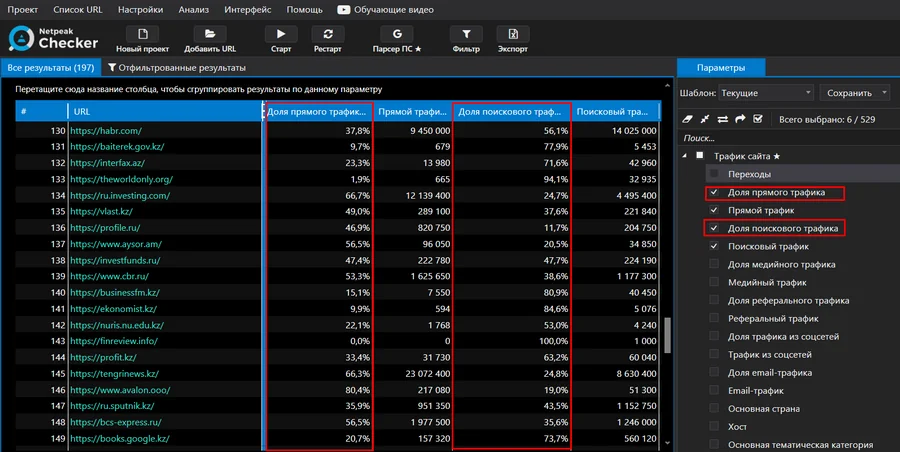
You can get traffic share data using Netpeak Checker: select “Direct traffic share” and “Search traffic share” in the settings and start collecting data.
You can manually view information about the ratio of website traffic sources using the SimilarWeb browser extension.
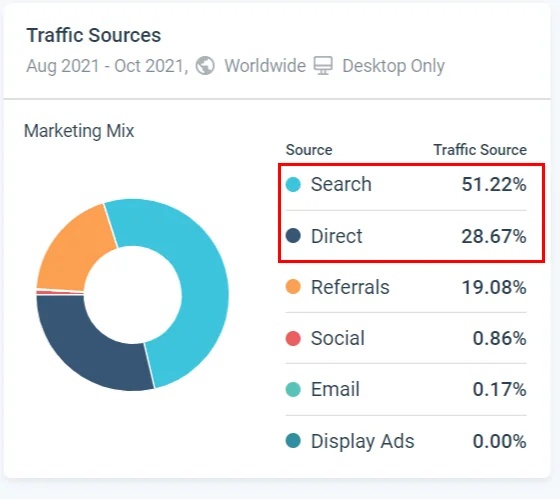
Or through the SimilarTech Prospecting extension if SimilarWeb data is not available for display in the free version.
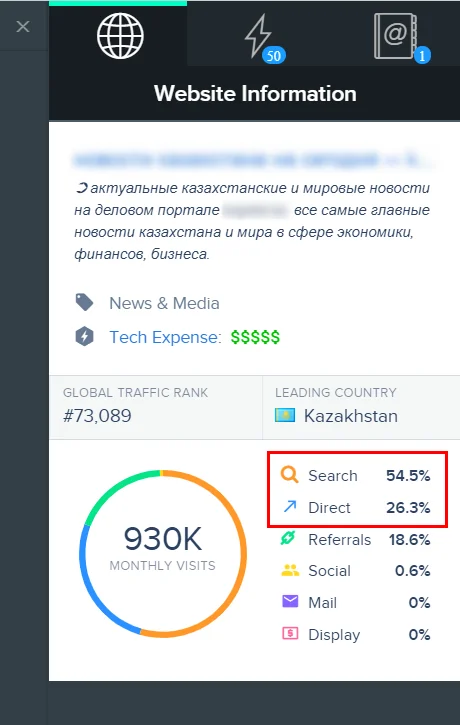
Removed from the list of sites those with a share of search and direct traffic that was less than half of the total.
Domain Rank (DR)
Domain Rating (DR) is a metric from Ahrefs that shows the strength of a website’s backlink profile compared to other sites in the service’s database on a 100-point scale. As Ahrefs points out , “Domain Rating does not take into account any other variables, such as link spam, traffic, domain age, etc.” This means that a high DR indicates high link popularity and link opportunities for a site. However, a site with a high DR may have backlinks that Google doesn’t consider, but which are taken into account by Domain Rating.
Since DR can be artificially inflated, when selecting potential donors, it’s best to compare a specific site’s metrics with other similar sites rather than relying on the absolute value. Backlink analysis is also recommended.
You can find the list of DR sites directly in Ahrefs. Select Batch Analysis, enter up to 200 domains at a time, and export the results.
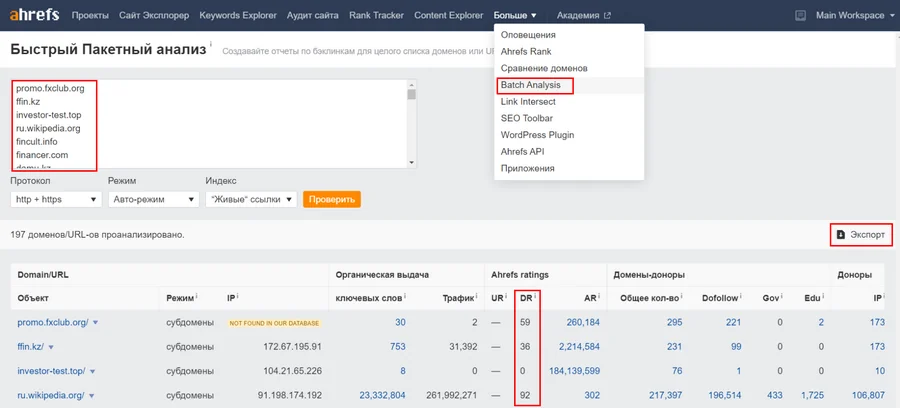
You can get data about the ranking of one specific domain.
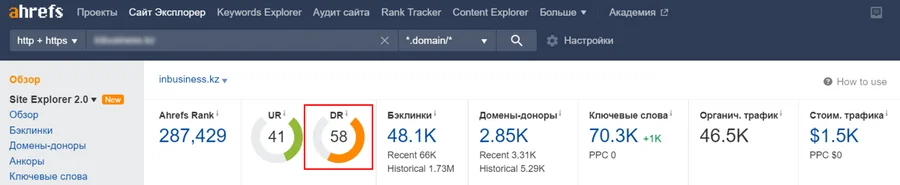
Ahrefs also provides a free tool called Website “Authority” Checker for checking DR.
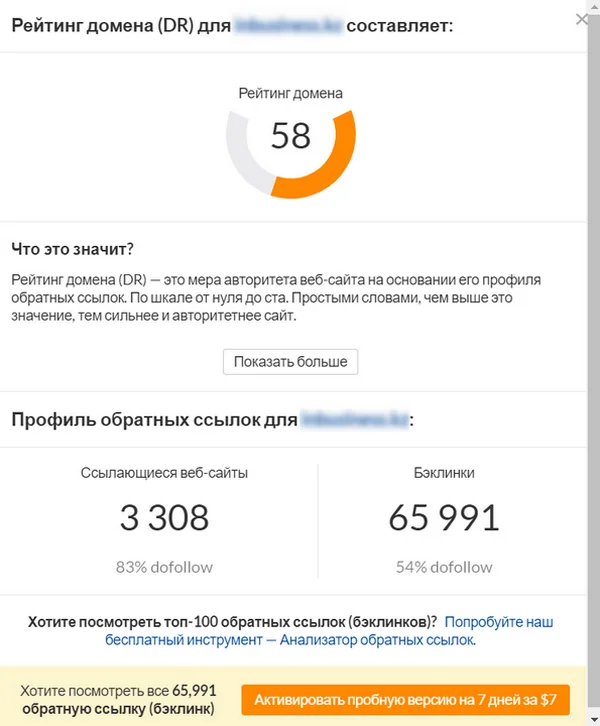
Next, I needed to remove sites with low DR from the list. Among the data I received, domain ratings ranged from 2 to 84. I kept sites with a DR of at least 25. Later, during analysis, I could raise the lower limit if necessary.
The ratio of the number of incoming and outgoing links
Potential donor sites should have more incoming links than outgoing ones. This means that if the resource sells links regularly, it does so selectively, and placement on it won’t trigger search engine filters.
You can check the number of incoming and outgoing links to sites in Serpstat using the “Link Analysis” report.
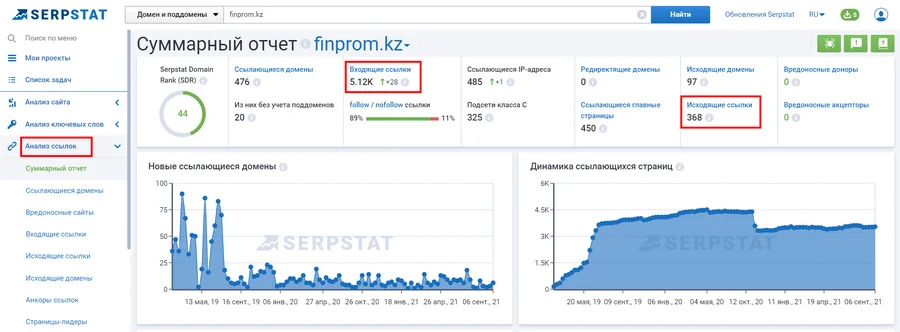
After collecting the numerical data and partially “cleaning” the list of sites, I began manual analysis:
- checking the subject matter and content;
- incoming link profile;
- backlink anchors;
- the dynamics of their growth.
Subject and content
A website’s subject matter and content are among the key selection criteria. These must be verified manually, so it’s best to do this after some resources have already been filtered out.
What to look out for:
- whether the site is one of your competitors – in this case, the link will, of course, not be posted;
- Is there a suitable section in the general media for posting your article?
- on the overall appearance of the site and the clickability of elements on the site;
- is there any intrusive advertising;
- How publications are formatted—is the text structured, are there any typos?
Backlink analysis of donor sites
It’s worth reviewing the backlinks of potential donors to ensure the placement is safe and that the resource is not heavily linked to by spam or low-quality sites.
In Ahrefs, the Backlinks report is best viewed in the “One link per domain” view to get an idea of your site’s link profile.
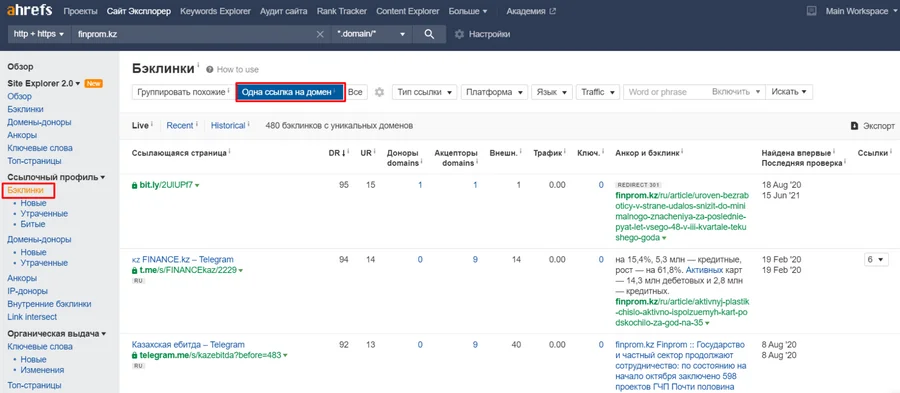
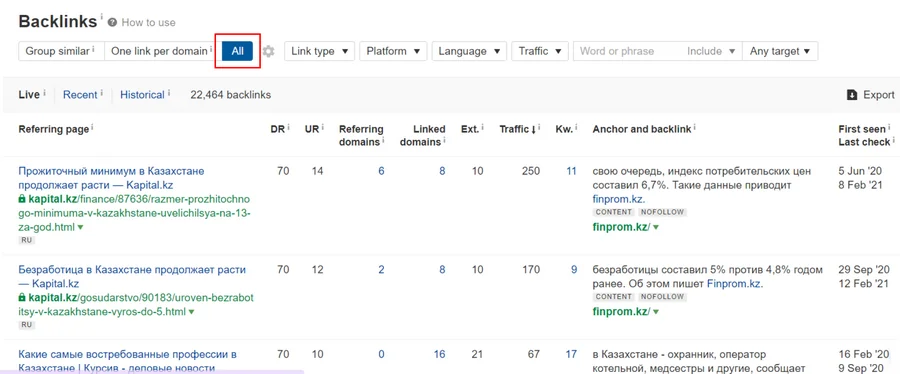
But if there are few backlinks, you can look at unique ones.
Ahrefs offers a free backlink checker called Backlink Checker, but it only shows the top 100 backlinks.
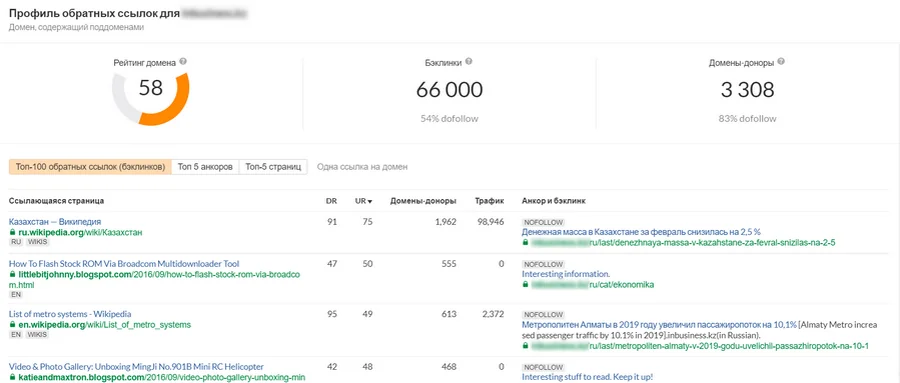
When analyzing, it’s worth paying attention to DR (Domain Rating) and UR (URL Rating): it’s desirable that high values prevail. I selected sites whose link profiles contained a majority of resources with a DR of 25 or higher.
Backlink anchors
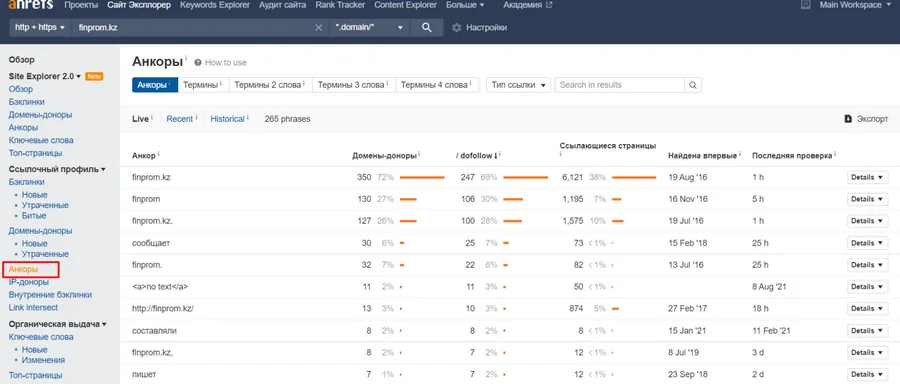
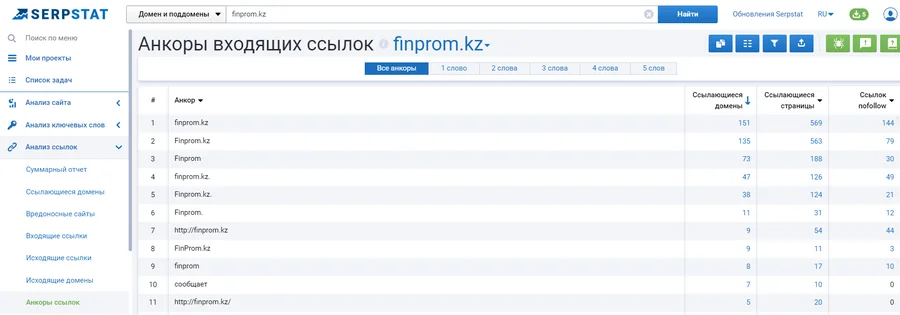
Backlink anchors pointing to a potential donor site should be natural, preferably with the site name as the predominant anchor, and the proportion of commercial anchors should be minimal.
You can view anchors in Ahrefs in the corresponding report.
And also in Serpstat.
Dynamics of link mass growth
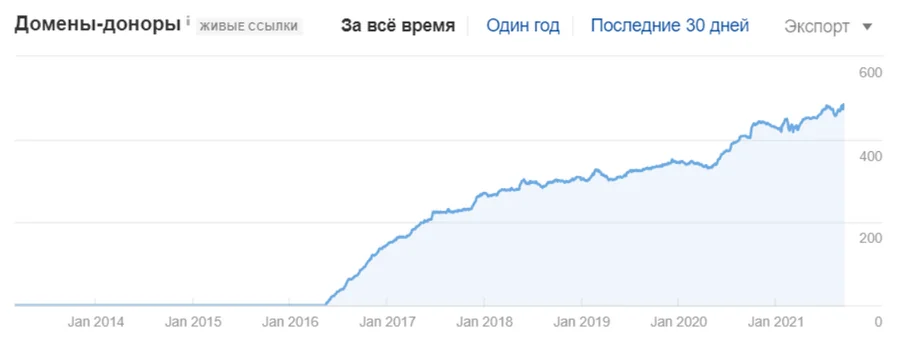
The easiest way to track link growth is using a graph: it should be smooth, without any jumps.
In Ahrefs, you can see this graph in the Overview report.
Search for contacts
After I’ve selected the most relevant and high-quality platforms I’d like to advertise on based on a combination of criteria, I need to collect their email addresses. This can be done automatically using Netpeak Checker:
First, create a Google spreadsheet using the formula =CONCATENATE pages with fragments contacts / kontakty / kontaktu / kontakti, since contact information is not always indicated on the main page of the site.
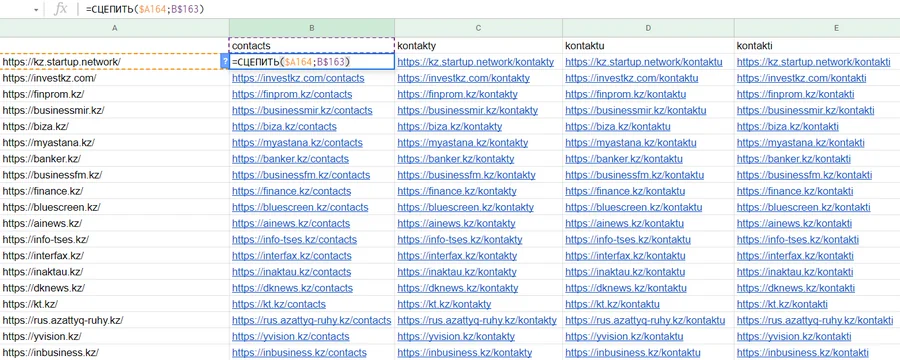
- Add all the resulting URLs to Netpeak Checker, select “Email addresses” in the parameters, and start collecting. Here’s what the results look like.
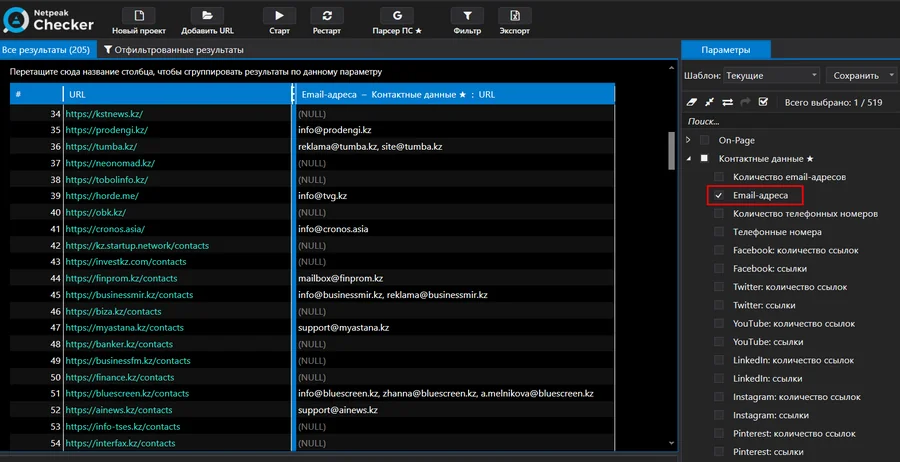
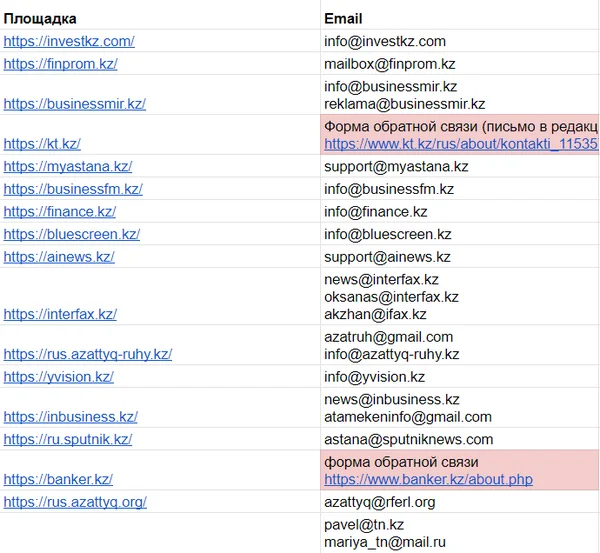
- Export data, delete generated pages for which contacts were not found.
- Manually search for contacts on websites for which email addresses couldn’t be collected. If the website doesn’t list email addresses, find other ways to contact them (such as a contact form).
Forming a letter to the webmaster
After collecting email addresses, you need to compose an email to the platform representatives. These are most often webmasters. It’s important to clearly state the purpose of the request—placing a permanent link—in the subject and body of the email. In addition to the price, you should also inquire about the type of link being placed (dofollow/nofollow/sponsored), the content language (relevant for multilingual regions), the length of the article, and the payment method.
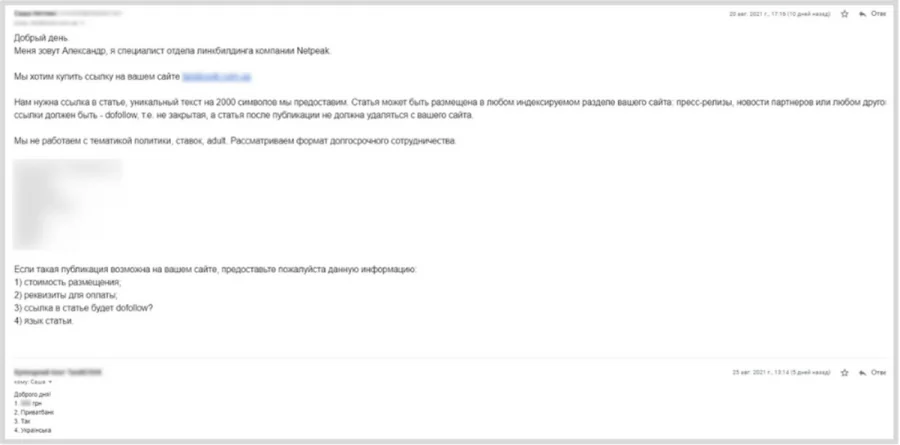
Example of correspondence with a site representative
If the site conditions are not suitable, it is worth noting this in a letter.
Selecting relevant sites based on price and metrics
Once you have both the metrics and the cost of placement, you can finally decide on the relevant sites based on the price-quality ratio. When collecting metrics, I already removed sites with very low metrics from the list (for example, sites with a DR of less than 25 and fewer than 5,000 visitors per month). From now on, the “comparison is everything” rule applies: when deciding whether to place a link on a specific site, its metrics and cost should be compared with other sites on the list.
There are several possible scenarios here:
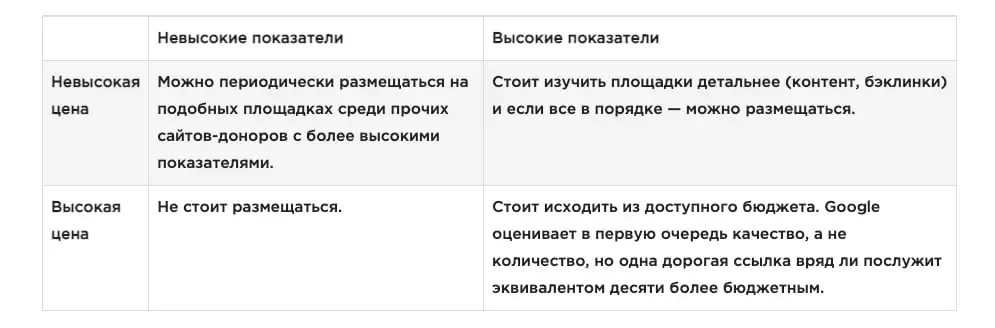
Here’s an example of the relationship between placement costs and metrics. High prices are highlighted in red, while questionable prices and poor metrics are highlighted in yellow.

To make selection and compilation of a monthly procurement list easier, sites can be divided into three categories:
- low performance and price;
- high performance and price;
- high performance and low price.
And mix them – this way the link mass will be balanced.
Writing an article taking into account the requirements of the sites
After selecting the platforms that offer the best value for money, you need to prepare content that meets their requirements.
It is necessary to draw up a technical specification for a copywriter, which should indicate:
- the topic of the article;
- language of the article (if necessary);
- text volume;
- keywords;
- the link and anchor being placed, whether the anchor can be inflected, and in what part of the article it is advisable to place the link (usually closer to the beginning);
- requirements for meta tags and article title (if necessary);
- Are H2-H3 level headings needed?
- main points of the article;
- requirements for text formatting (numbered and bulleted lists, tables);
- the presence of images, the need to specify alt and title attributes for them;
- Article uniqueness percentage and verification service.
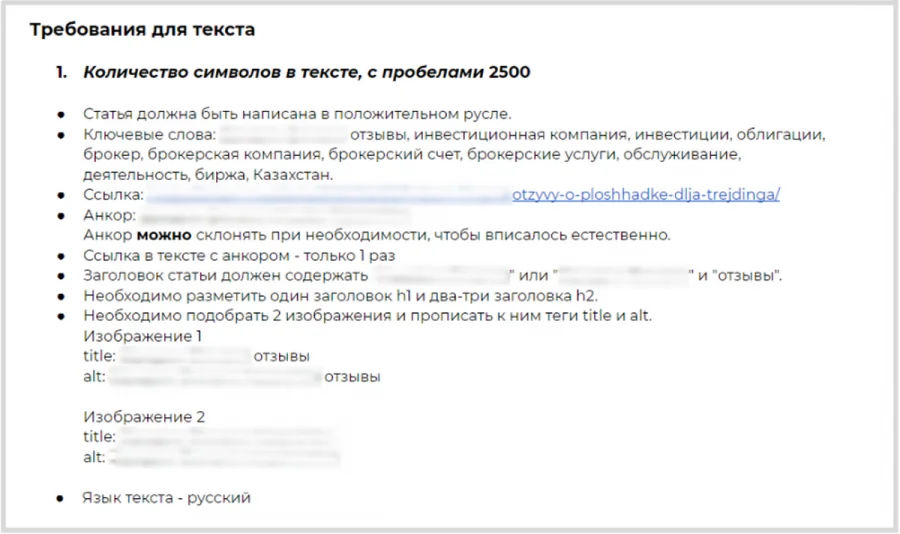
Example of requirements for text
Posting an article on a donor site
The finished article is sent to the site’s webmaster. After publishing, it’s important to check:
- Link validity. The most common mistakes are posting with the http protocol instead of https, with an extra slash at the end, or without one, resulting in a redirect when clicking.
- Link attributes (dofollow or nofollow, depending on the agreement). In the former case, links can be indexed, which will provide additional link juice.
- Is the article page closed in the noindex tag?
- Text according to the terms of reference (are the headings marked up, are the alt and title attributes for images specified, are the lists and tables displayed correctly, etc.).
If there are any errors, please contact the platform representative and request corrections. In practice, changes can be made promptly—within a few hours. If everything is posted correctly, thank them for publishing.
Analysis of link placement results
Two to three months after placing the link, it is worth checking the page’s position by anchor (if an anchor link was placed) and traffic.
You can check your positions in Google Search Console for the last 2 months and compare them with the data for the 2 months prior to posting.
You can get page traffic data for two months in Google Analytics’ Landing Pages report by looking at the number of new users for the specified date range. You can also use the Acquisition – Channels report in Google Analytics to see the websites from which referral traffic was sent and whether any clicks from the donor site were made through the link.
Remember
Outreach is a safe method of acquiring links. By selecting relevant, high-quality sites and creating useful content, you can significantly improve your website’s rankings and traffic.
The main criteria for selecting sites for placing links are:
- the main region of the potential donor site;
- website traffic;
- traffic source ratio;
- Domain Rank;
- the ratio of the number of incoming and outgoing links;
- subject matter and content;
- website backlinks;
- incoming link anchors;
- dynamics of link mass growth.
And the algorithm for obtaining links looks like this:
- Collection of key queries.
- Collecting a list of sites for these queries or through competitor analysis.
- Determining the relevance and quality of collected resources. Screening by criteria.
- Collecting email addresses of website representatives.
- A letter of inquiry to find out the cost and conditions of accommodation.
- Selection of relevant sites based on the ratio of price and metrics.
- Preparing content according to platform requirements.
- Posting and checking materials and links.
- Analysis of link placement results.
Source: Netpeak Journal