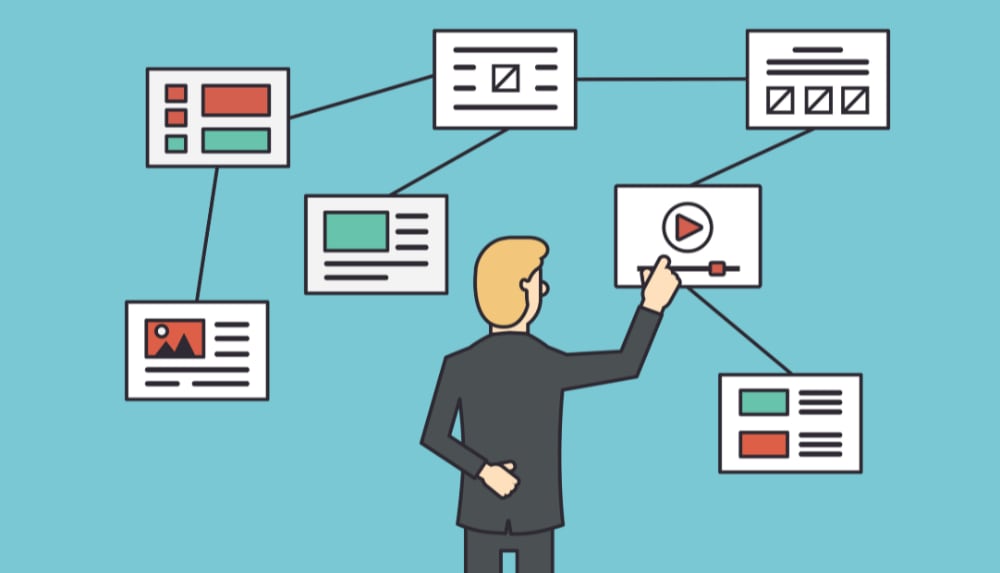
The foundation of a website is a properly created structure. However, there’s no definitive answer to the question of what this structure should be. What’s clear is that it must be selected strictly individually for each project. There are also certain search engine requirements that must be followed in all cases. Let’s talk about that.
What is the logical structure of a website?
A website’s logical structure is the collection of all pages on the site, arranged hierarchically. That is, the relationship between pages, which traces their affiliation with sections, categories, subcategories, and other page types (product pages, tags, filters, etc.).
The website structure should be designed to simplify the transition from general topics to the specific information they’re looking for. This determines user experience, the time they spend on your site, and the actions they take. A confusing navigation system and excessive content structure will lead to nothing good.
The Importance of Proper Website Structure for Search Engines
Each search engine has its own structure requirements. I’ll describe the most basic ones.
Google’s Site Structure Guidelines
1. Use a logical hierarchy. Users should be able to easily navigate to any page on your website. To achieve this, use navigation bars, also known as “breadcrumbs.” They will help users find the section they need and avoid getting lost on the site. They look like this:

2. Use text links rather than banner (image) links. This will allow search engines to more accurately assess the link’s relevance, making it easier for them to crawl and analyze your site’s content.
3. For visitors, create a navigation page (HTML sitemap) and a Sitemap.xml file in which you specify target URLs and last modified dates so that Googlebot can quickly find new and modified pages in your structure.
4. Create informative 404 pages. Provide links to the home page and popular sections of the site so that if a user lands on a non-existent page, they won’t leave your site and will continue searching for the information they need.
5. Use human-readable page addresses (HRAs) instead of URL identifiers. They are more understandable to visitors, easier to remember, and indicate which page the user is on.
For example, instead of https://site.com/index.php?cat=10&subcat=2&id=41 use https://site.com/product/phone/samsung/.
6. Create a simple directory structure so that the site is easy to navigate and page URLs reflect the content of the page.
7. Use different URLs for different documents. There should only be one unique address on the site.
You can read more about Google’s recommendations in the help section.
Why is a proper website structure necessary?
Proper structure is important for both users and search engines. Here are the main benefits of a well-organized structure:
1. Improving usability. Simple and convenient navigation allows users to quickly find the information they need. This will help them stay on the site longer and improve behavioral ranking factors.
2. Speeding up page indexing. A logical website structure helps search engines understand which pages are important to the webmaster and end user. SEOs adhere to the three-click rule, where the most important pages should be no more than three clicks away from the homepage. Otherwise, search engines may not index the page, index it later, or its priority may be very low.
3. Reducing technical errors. Proper structure will help avoid duplicate pages, saving time and money on promotion.
4. Distribution of internal link equity. Link equity is distributed according to the importance of pages. It’s essential that promoted pages have a sufficient number of internal links. The more links that point to priority pages, the more important they are for search engines.
5. Coverage of a large number of queries. Creating additional sections, categories, and landing pages for narrow groups of queries allows you to rank for a large number of keywords. These pages will be more relevant to the selected narrow group of queries, which will help attract more organic traffic.
Types of website structures
To understand which structure to use, it’s important to understand the advantages and disadvantages of each. The following types of structures exist:
Linear — a layout of pages arranged in a chain. The user lands on the main page and then scrolls through all subsequent pages, like a book. This structure lacks hierarchy and all pages are treated equally. They are viewed one after the other, starting with the first and ending with the last. It is important that the pages link to each other.

This structure isn’t ideal for attracting users, as only the homepage can be promoted. Link juice flows from the homepage, passing it on to all subsequent pages, and ending with the last page.
The linear structure is best used for business card websites, presentation websites, landing pages, and others.
Linear structure with branches. The same principle as linear, except here there are branches within the chain.

This type of structure is typically found in small corporate websites, author blogs, online books, landing pages, business card websites, and others.
Block (lattice) website structure. In this structure, all pages are equal, except for the homepage. All blocks are located next to each other and link to several others. Link juice is distributed evenly. This page layout has a positive effect on website indexing.
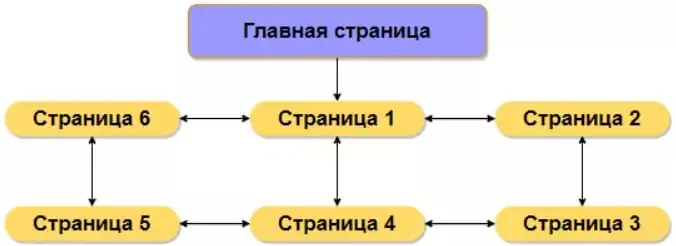
A block structure is typically used for a specific service or product, where each page describes the characteristics or type of service.
This scheme is not often seen, as it is not suitable for every site and is difficult to implement.
Tree-like (hierarchical) website structure. The most popular and optimal option for most websites. Each subsequent page is part of the previous one.
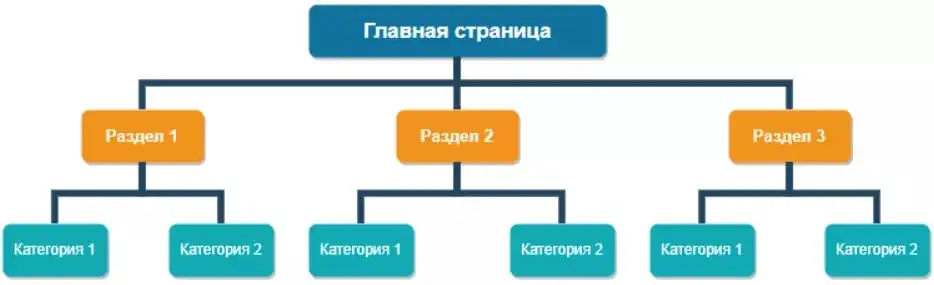
This is the best option for SEO, as the multi-level structure allows you to highlight more important pages for promotion.
The versatility of the tree structure allows it to be used for various types of websites. It is used for online stores, information resources, commercial sites, portals, and so on.
Errors when creating a website structure
It’s important to avoid mistakes when creating a website structure. They can cause a lot of problems for the website owner. Let’s look at the typical mistakes webmasters make:
The page is optimized for different intents (the meaning a user assigns to a search query). For example, using Serpstat, we check the search volume for the query “cabinets and dressers.” We see that users don’t often search for the following phrase:
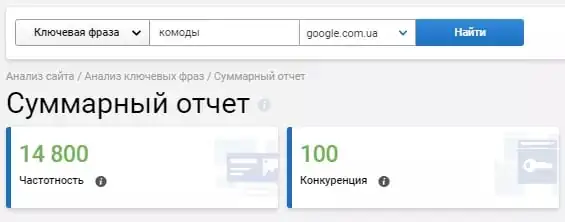
It will be much more efficient if you create a separate “Cabinets” page and a “Chests of Drawers” page:
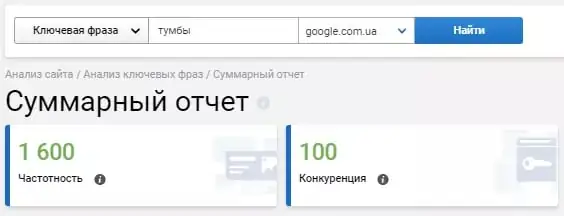

This way, you will have two relevant pages on your site and the opportunity to get significantly more traffic.
What are internal page duplicates and how to deal with them?
Duplicate pages. Let’s take a fishing website as an example. The webmaster created a “Reels” section, which includes a “Baitcaster Reels” category:
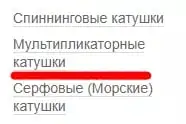
I also created a filter “Type” with the value “Multiplier Coil”:

Thus, two identical pages exist on the site, which begin to compete with each other in search results for target queries. This leads to a decline in the site’s ranking, a loss of natural link mass, and a change in the relevant page in the search results, as the search engine is confused about which page to show for a specific query.
Fuzzy duplicates. Another common mistake is so-called “page cannibalization.” This occurs when specialists create different pages on a website for similar groups of queries.
For example, a flower delivery website has different pages: inexpensive flowers, cheap flowers, budget flowers.
Such pages lead to problems with website indexing. This should be addressed during the semantic core collection and clustering stage.
Highly nested pages. Web pages with a nesting level of four or higher are often poorly indexed by search engines. The site structure must be designed so that important pages are no more than three clicks away from the homepage. For large websites and online stores, this is unavoidable. For such projects, sitemaps are created and effective internal linking is configured to highlight priority pages to users and search engines.
Lack of a sitemap. This error also impacts page indexing speed. For large projects, two sitemaps should be created:
For search robots, the Sitemap.xml file is located in the root of the site. It shows the crawler all the pages needed for indexing and notifies about the appearance of new pages;
For users, a separate page listing all the important site pages, arranged hierarchically. The purpose of this page is to simplify site navigation.
For small web resources, the lack of sitemaps is not a critical error.
Incorrect page distribution. It’s important to create new website pages that align with the semantics of previous pages. This means they’re properly organized into appropriate sections and categories. Refrigerators should be in the large appliances section, not the plumbing section. But such decisions aren’t always obvious. For example, should air conditioners be in the HVAC section or the home appliances section?
Remember
- The logical structure of a website is the foundation of your web resource. The success of user and search engine interactions with the site depends on how well and accurately this structure is developed.
2. When creating the correct website structure, it is necessary to adhere to the recommendations of search engines.
3. Advantages of the logical structure:
- improving usability;
- acceleration of page indexing;
- reduction in the number of technical errors;
- distribution of internal link weight;
- coverage of a large number of queries.
4. The type of structure depends on the type of your site:
- linear structure of the site;
- linear with branches;
- block structure;
- tree structure.
5. Typical mistakes when creating the correct structure:
- the page is optimized for different user intents;
- duplicate pages;
- fuzzy takes;
- high level of page nesting;
- lack of sitemaps;
- failure to respect page hierarchy.
Source: Netpeak