
The URLs are different, but the page content is the same. You think it’s no big deal? Just a couple of identical pages on the site. But duplicate content can be filtered by search engines. To prevent this, you need to know how to remove internal duplicate pages.
The concept of duplicate pages and their types

Duplicates are individual website pages whose content is completely or partially identical. Essentially, they are copies of the entire page or a specific portion of it, accessible via unique URLs.
What causes duplicates on a website:
1. Automatic generation of duplicate pages by the website’s content management system (CMS). For example:
https://site.net/press-centre/cat/view/identifier/novosti/
https://site.net/press-centre/novosti/
2. Errors made by webmasters. For example, when the same product is listed in multiple categories and accessible at different URLs:
https://site.net/category-1/product-1/
https://site.net/category-2/product-1/
3. Changing the site structure, when existing pages are assigned new addresses, but duplicates with the old addresses are retained. For example:
https://site.net/catalog/product
https://site.net/catalog/category/product
There are two types of duplicates: full and partial.
What are full takes?
These are pages with identical content, accessible at unique, distinct URLs. Examples of complete duplicates:
1. URLs of pages with and without slashes (“/”, “//”, “///”) at the end:
https://site.net/catalog///product; https://site.net/catalog//////product.
2. HTTP and HTTPS pages: https//site.net; http//site.net.
3. Addresses with “www” and without “www”: http//www.site.net; http//site.net.
4. URLs of pages with index.php, index.html, index.htm, default.asp, default.aspx, home:
https://site.net/index.html;
https://site.net/index.php;
https://site.net/home.
5. Page URLs in upper and lower case:
https://site.net/example/;
https://site.net/EXAMPLE/;
https://site.net/Example/.
6. Changes in the URL hierarchy. For example, if a product is available at several different URLs:
https://site.net/catalog/dir/tovar;
https://site.net/catalog/tovar;
https://site.net/tovar;
https://site.net/dir/tovar.
7. Additional parameters and tags in URL.
- URL with GET parameters: https://site.net/index.php?example=10&product=25 . The page is completely identical to the following: https://site.net/index.php?example=25&cat=10 .
- Presence of utm-tags and gclid parameters. UTM tags help provide analytics systems with information for analyzing and tracking various traffic parameters. The URL of the landing page to which UTM tags are added looks like this: https://www.site.net/?utm_source=adsite&utm_campaign=adcampaign&utm_term=adkeyword
- gclid (Google Click Identifier) parameters. A target URL tag that’s automatically added to track company, channel, and keyword data in Google Analytics. For example, if someone clicks on your ad for the website https://site.net , the visitor’s destination URL will look like this: https://site.net/?gclid=123xyz .
- Openstat label. It’s universal and is also used to analyze the effectiveness of advertising campaigns, website traffic, and user behavior. Link with the “openstat” tag: https://site.net/?_openstat=231645789.
- Duplicates created by a referral link. A referral link is a special link with your ID that websites use to identify the referrer of a new visitor. For example: https://site.net/register/?refid=398992; https://site.net/index.php?cf=reg-newr&ref=Uncertainty.
8. The first page of the pagination of an online store’s product catalog, classifieds board, or blog. It often corresponds to a category page or the general page of the pageall section: https://site.net/catalog; https://site.net/catalog/page1.
9. Incorrect 404 error settings lead to numerous duplicates. For example: https://site.net/rococro-23489-rocoroc; https://site.net/8888-???.
Bold text may contain symbols and/or numbers. Pages of this type should return a 404 server response code (not 200) or redirect to the current page.
What are partial takes?
Partially duplicated pages have the same content, but there are slight differences in the elements.
Types of partial takes:
1. Duplicate entries on product cards and category (catalog) pages. These duplicates arise from product descriptions that appear on the catalog’s general product page. These same descriptions are also present on the product card pages. For example, in the catalog, each product’s category page contains a description of that product:

And the same text on the product page:

To avoid duplicates, don’t display full product information on the category (catalog) page. Or use a unique description.
2. Duplicates on filter, sort, search, and pagination pages where there is similar content and only the order changes. The description text and headings remain unchanged.
3. Duplicates on print or download pages, the data of which fully corresponds to the main pages. For example:
https://site.net/novosti/novost1
https://site.net/novosti/novost1/print
Partial duplicates are harder to detect. However, their consequences are systematic and negatively impact a site’s ranking.
What are the consequences of duplicate pages on a website?
Duplicates can appear regardless of the age or number of pages on a website. They won’t prevent visitors from accessing the information they need. The situation is entirely different with search engine crawlers. Since the URLs are different, search engines treat these pages as separate.
The consequence of a large amount of duplicate content is:
- Problems with indexing. Generating duplicate pages increases the overall size of a website. Bots indexing these “extra” pages waste the website owner’s crawl budget.
- The “necessary” pages may not be indexed at all. Let me remind you that crawl budget is the number of pages that a bot can scan in one visit to a site.
- Changes to the relevant page in search results. The search engine algorithm may decide that the duplicate is more relevant to the query. Therefore, it will show a different page in the search results than the one intended for promotion. Another result: due to competition between the duplicate pages, neither will appear in the search results.
- Loss of link weight of pages that are being promoted. Visitors will link to duplicates rather than the original pages. The result is a loss of natural link equity.
Catalog of tools for finding duplicate pages
So, we’ve already covered what duplicates are, what types they are, and what they lead to. Now let’s move on to how to detect them. Here are some effective methods:
Finding duplicates using special programs
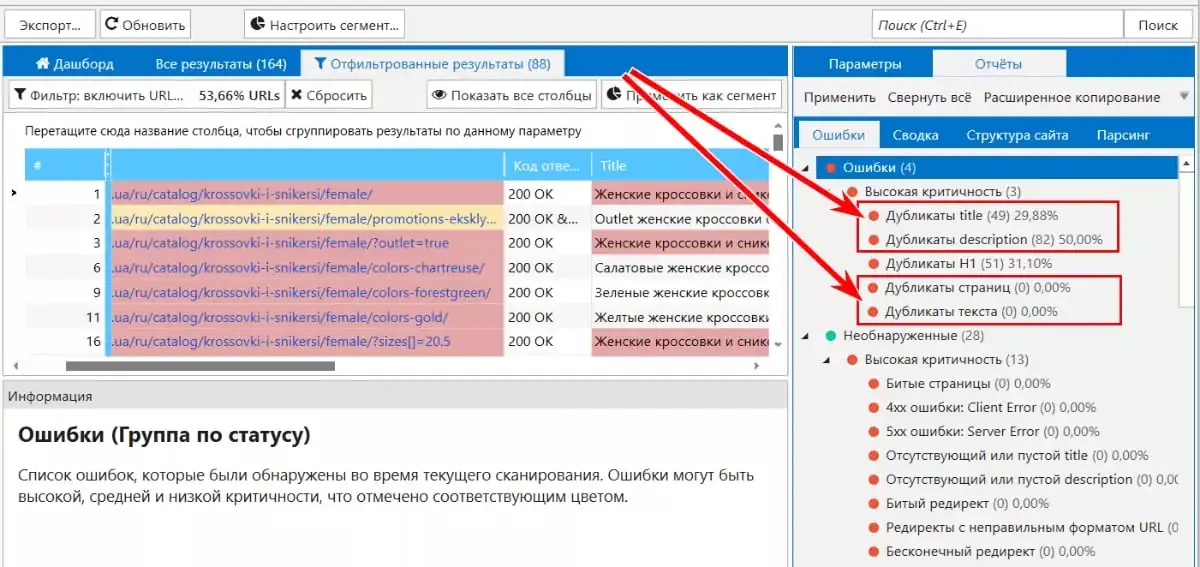
Netpeak Spider . Scanning can detect pages with duplicate content: complete page duplicates, page duplicates based on block content< body> , duplicate Title tags and Description meta tags.
Using search operators
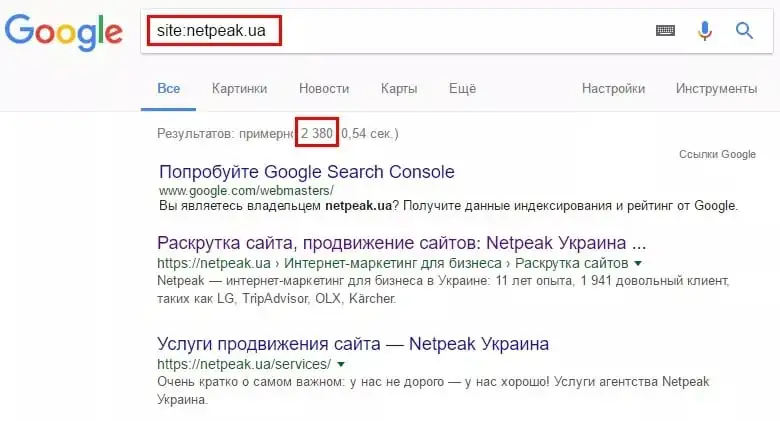
To find duplicates, you can analyze pages that are already indexed using the “site:” search operator. To do this, enter “site:examplesite.net” into a search bar, such as Google. This will show the site’s pages in the general index. This will also show the number of pages in the search results if it differs significantly from the number of pages found by the spider or pages in the XML sitemap.
By reviewing the search results, you will find duplicate pages, as well as “junk” pages that need to be removed from the index.
You can also use the search function to analyze search results for a specific text fragment from pages you suspect may contain duplicates. To do this, enclose the text in quotation marks, followed by a space, the “site:” operator, and enter it into the search bar. You’ll need to specify your website to find pages containing this specific text. For example:
“A fragment of text from a website page that may have duplicates” site:examplesite.net
If the search results show only one page, then there are no duplicates. If there are multiple pages in the search results, you need to analyze them and determine the reasons for the duplicate content. These may be duplicates that need to be eliminated.
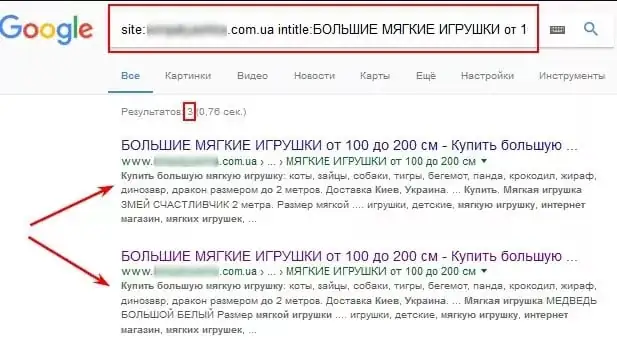
Similarly, using the “intitle:” operator, we analyze the “Title” content on pages in search results. Duplicate “Titles” can indicate duplicate pages. To check, we use the “site:” search operator. We enter a query like this:
site:examplesite.net intitle:full or partial text of the Title tag.
Using the “site” and “inurl” operators, you can identify duplicate pages that appeared on sorting pages (sort) or on filter and search pages (filter, search).
For example, to search for sorting pages, you need to enter the following in the search bar: site:examplesite.net inurl:sort.
To find filter and search pages: site:examplesite.net inurl:filter,search.
Remember, search engines only show duplicates that have already been indexed. Therefore, you can’t rely entirely on this method.
How to get rid of duplicates
We’ve already covered duplicates, their types, their consequences, and how to find them. Now let’s move on to the most interesting part: how to stop them from harming your optimization. We’ll use duplicate page elimination methods:
301 redirect
Considered the primary method for eliminating complete duplicates, a 301 redirect automatically redirects one page of a website to another. A configured redirect tells bots that the page at a given URL is no longer accessible and has been moved to a different address.
301 redirect allows you to transfer link juice from the duplicate page to the main page.
This method is relevant for eliminating duplicates that appear due to:
- URL in different registers;
- URL hierarchies;
- determining the main site mirror;
- problems with using slashes in URLs.
For example, 301 redirect is used to redirect from pages:
- https://site.net/catalog///product;
- https://site.net/catalog//////product;
- https://site.net/product to the page https://site.net/catalog/product.
Robots.txt file
This method allows us to advise search bots which pages or files should not be crawled.
To do this, you need to use the “Disallow” directive, which prevents search bots from visiting unnecessary pages.
User-agent: *
Disallow: /page
Please note that if a page is listed in robots.txt with a Disallow directive, it may still appear in search results. Why? It may have been indexed previously, or there may be internal or external links pointing to it. Robots.txt instructions are advisory for search bots and cannot guarantee the removal of duplicates.
Meta tag< meta name=\”robots\” content=\”noindex, nofollow> And< meta name=\”robots\” content=\”noindex, follow>
Meta tag Tells the robot not to index the document or follow links. Unlike robots.txt, this meta tag is a direct command and will not be ignored by search engines.
Meta tag instructs the robot not to index the document, but to follow the links contained in it.
But, as Google spokesman John Mueller reports, sooner or later the “noindex, follow” meta tag is perceived by the search engine as “noindex, nofollow”.
This means that if a bot visits the page for the first time and sees the “noindex, follow” directive, it doesn’t index the page, but there’s still a chance it will click on internal links. However, if the bot returns after a while and sees “noindex, follow” again, the page is completely removed from the index, and the bot stops visiting it and counting any links on it. This means that in the long run, there’s no difference between the “noindex, follow” and “noindex, nofollow” meta tags.
To use the method, you need to place it on duplicate pages in the block< head> one of the meta tags:
<meta name=\”robots\” content=\”noindex, nofollow\” /> or similar:< meta name=\”robots\” content=\”none\” /> ;< meta name=\”robots\” content=\”noindex, follow\” /> .
The rel=\”canonical\” attribute
Use this method when the page cannot be deleted and needs to be left open for viewing.
A tag for eliminating duplicates on filter and sort pages, pages with GET parameters, and UTM tags. It’s used for printing, when using the same information content in different language versions, and across different domains. The rel=”canonical” attribute for different domains is not supported by all search engines. Google will understand it.
By specifying a canonical link, we specify the address of the page preferred for indexing. For example, a website has a “Laptops” category. It contains filters that display various selection parameters, such as brand, color, screen resolution, case material, and so on. If these filter pages are not to be promoted, we specify the general category page as the canonical link for them.
How do I set a canonical page? Place the rel=”canonical” attribute between the … tags in the current page’s HTML code.
For example, for pages:
- https://site.net/index.php?example=10&product=25;
- https://site.net/example?filtr1=%5b%25D0%,filtr2=%5b%25D0%259F%;
- https://site.net/example/print.
The canonical page will be https://site.net/example.
In HTML code it will look like this: <link rel=\”canonical\” href=\”https://site.net/example\” /> .

Conclusions
1. Duplicates are separate website pages whose content is completely or partially identical.
2. Reasons for duplicates on a website: automatic generation, errors made by webmasters, changes to the website structure.
3. What duplicates on a website lead to: indexing becomes worse; the relevant page in search results changes; loss of natural link mass for promoted pages.
4. Methods for searching for duplicates: using parser programs (Netpeak Spider); search operator site.
5. Duplicate removal tools: relevant commands in the robots.txt file; meta name tag=\”robots\” content=\”noindex, nofollow\”; rel tag=\”canonical\”; 301 redirect.
Have you eliminated duplicate content? Now it’s time to re-check your site. This will help you see the effectiveness of your actions and evaluate the efficiency of your chosen method. We recommend regularly analyzing your site for duplicates. This is the only way to identify and correct errors promptly.
Source: Netpeak